

Get in Touch
WordPress vs Webflow:
which platform is better for a growing website?
WordPress is flexible, but it can become slow, messy, and harder to manage as your website grows. Webflow gives marketing teams a cleaner way to build, edit, and optimize a site without relying on plugins or constant developer support.

WordPress vs WebflowCompare WordPress and Webflow for growth
Choose Webflow when your website needs to move faster
WordPress still works well for complex publishing, memberships, and custom backend needs. But if your site feels slow, messy, or hard to maintain, moving to Webflow can make growth easier.
Faster marketing updates
Launch new pages, update content, and improve messaging without waiting on developers for every small change.
Cleaner performance and SEO
Reduce plugin bloat, improve technical structure, and create a faster foundation for search and conversion.
Less maintenance overhead
Avoid the constant cycle of plugin updates, theme conflicts, hosting issues, and security patches.
Most WordPress problems appear after the site starts growing
WordPress often works well at the beginning. The problems usually show up later, when the business needs more landing pages, stronger SEO, faster campaigns, better design consistency, and easier internal updates.
Common signs WordPress is holding your team back:
.webp)
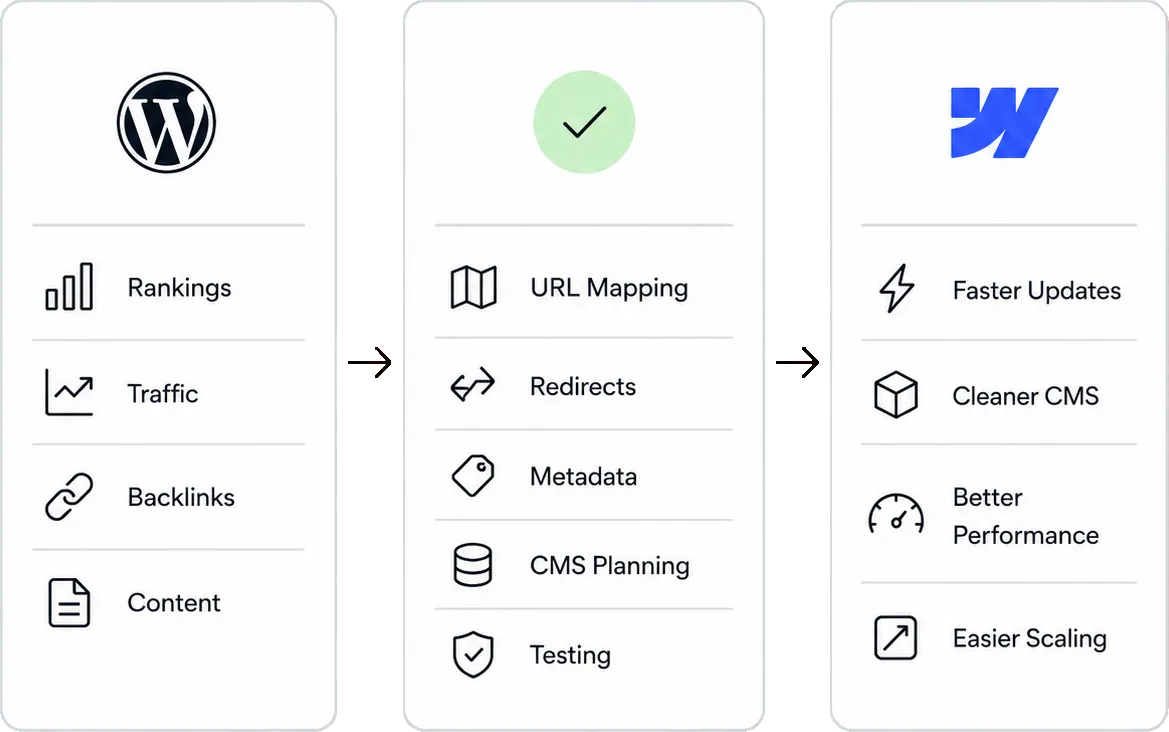
Moving from WordPress to Webflow should be handled carefully
A WordPress to Webflow migration is not just a redesign. If the site already has organic traffic, indexed pages, backlinks, blog content, or important landing pages, the migration needs to protect SEO from day one.
A proper migration should include URL mapping, redirects, metadata preservation, CMS planning, content cleanup, technical QA, and post-launch monitoring. Done well, Webflow can give you a cleaner system without sacrificing the traffic your current site has already earned.
Everything you
need to know today
Is Webflow better than WordPress?
Webflow is usually better for growth-focused marketing websites that need strong design control, fast updates, clean performance, and lower maintenance. WordPress can still be better for complex publishing, custom backend functionality, or plugin-heavy use cases.
Is Webflow better than WordPress for SEO?
Webflow gives you a cleaner technical foundation out of the box, but SEO results still depend on content quality, site structure, internal linking, redirects, and ongoing optimization. WordPress can perform well too, but it often requires more plugins and maintenance.
Should I migrate from WordPress to Webflow?
You should consider migrating if your WordPress site is slow, hard to edit, difficult to maintain, inconsistent visually, or limiting your marketing team. If your site relies on complex WordPress-specific functionality, the migration needs more careful planning.
Will I lose SEO traffic when moving from WordPress to Webflow?
You should not lose traffic if the migration is planned correctly. The key is preserving important URLs, setting up redirects, carrying over metadata, rebuilding the CMS structure properly, and checking technical SEO before and after launch.
Is Webflow easier to maintain than WordPress?
For most marketing websites, yes. Webflow removes many common WordPress maintenance tasks like plugin updates, theme conflicts, hosting setup, and security patching.
Who is WordPress still best for?
WordPress is still a strong fit for complex publishing operations, membership platforms, custom plugin ecosystems, and teams with existing WordPress development resources.