

Get in Touch
Website Migration SEO Checklist for Webflow Projects


A website migration SEO checklist is only useful if it helps your team protect the pages, content, redirects, tracking, and conversion paths that already matter.
For Webflow projects, that means checking more than redirects and metadata. You also need to protect CMS content, high-value landing pages, canonical rules, sitemap behavior, analytics events, forms, CRM routing, and the URLs that already support pipeline.
Use this checklist if you are moving a SaaS, B2B, or founder-led site into Webflow, rebuilding an existing Webflow site, or validating a migration plan before launch.
The safest migrations treat SEO, CMS, tracking, and launch ownership as one launch-readiness system: what to check before launch, what to test on launch day, what to monitor after launch, and when to get expert review.
First, Decide How Risky Your Webflow Migration Is
Not every migration needs the same level of QA. A small site with stable URLs is different from a SaaS site with hundreds of blog posts, demo pages, paid landing pages, and CRM-connected forms.
Start by deciding how much risk you are carrying.
High-risk migration signals
Your migration needs stricter planning if several of these are true:
Migration risk is not only about site size. A 30-page SaaS site with demo forms and strong organic leads can carry more risk than a larger site with little search visibility.
On a WordPress-to-Webflow migration with 120+ blog posts, the risk was not just "move the content." The work depended on URL planning, CMS field decisions, redirect mapping, template QA, and analytics checks before design approval meant launch-ready.
Lower-risk migration signals
The migration may be lighter if:
- URLs are mostly unchanged.
- The site has limited organic traffic.
- There is little or no CMS content.
- The project is mostly visual.
- Forms, CRM routing, and analytics are not changing.
- The site does not depend on organic leads.
Even lower-risk migrations need checks. They just may not need a full migration audit, large redirect map, or extended monitoring plan.
The better move is to match the checklist to the actual business risk.
Pre-Launch Website Migration SEO Checklist
Most SEO migration failures are created before launch day. By the time the site is published, rushed redirect mapping, incomplete CMS setup, missing tracking requirements, and unclear ownership are harder to fix cleanly.
Use this pre-launch checklist before publishing the Webflow site.
Benchmark and inventory the existing site
Before changing URLs, templates, or CMS structure, capture what the current site has.
Do not rely on sitemap URLs alone. Sitemaps can miss orphaned landing pages, old campaign URLs, redirected pages, and content with backlinks. Use crawl data, analytics, Search Console, backlink data, and known campaign URLs together.
This inventory becomes the source of truth for redirects, CMS migration, launch QA, and post-launch monitoring.
Prioritize pages before mapping redirects
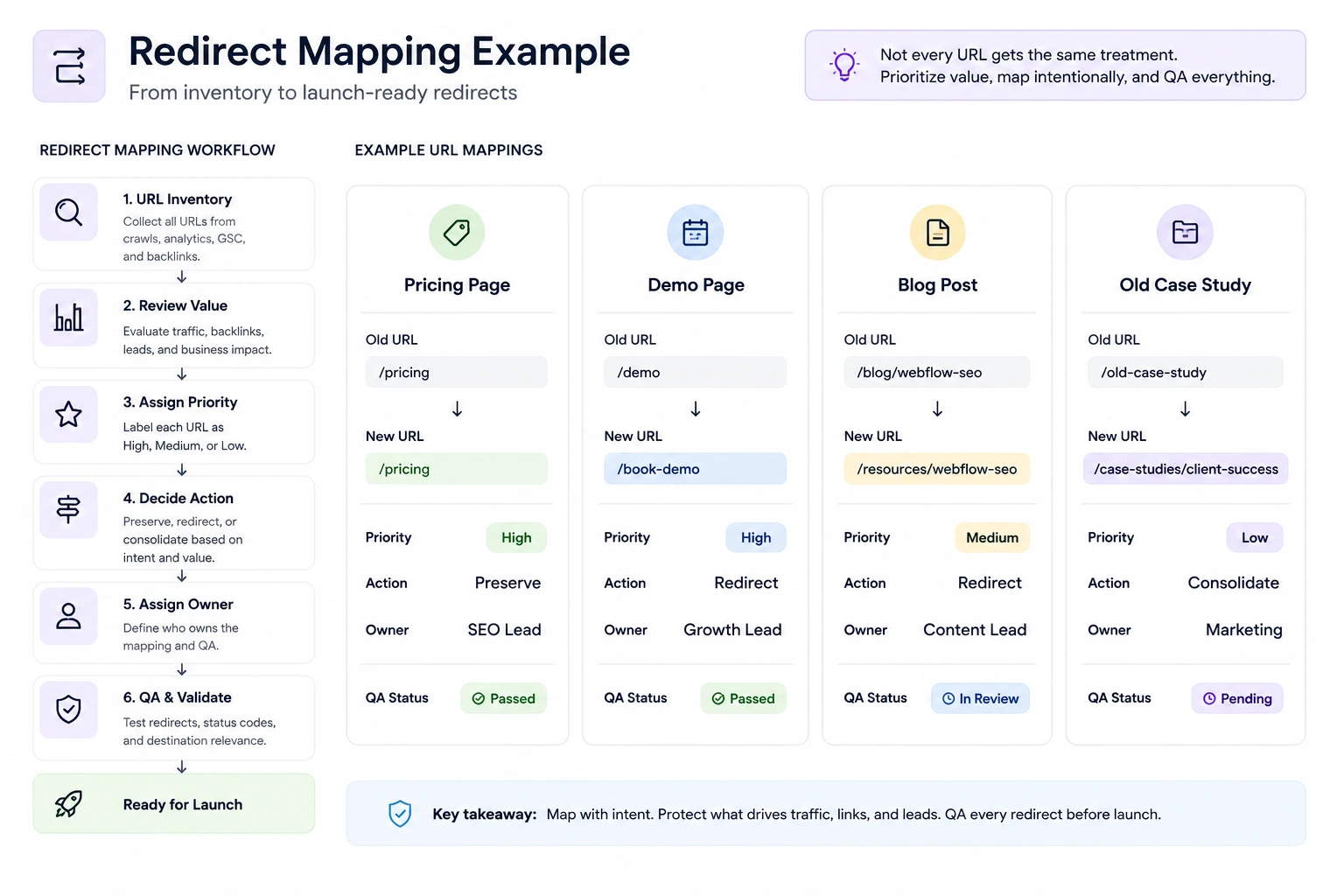
Redirect mapping should not start as a mechanical old URL to new URL exercise. Start with value.
Use this decision table:
For important pages, use explicit one-to-one redirects where possible. Wildcard redirects can reduce workload, but they should not replace deliberate mapping for pages that drive traffic, backlinks, or leads.
Plan static page redirects and Collection item redirects separately. A few changed Webflow Collection slugs can multiply redirect work across blog posts, resources, authors, categories, or case studies.
Common redirect mistakes include mapping only sitemap URLs, forgetting CMS Collection URLs, sending too many URLs to the homepage, creating redirect chains, missing old blog slugs, and failing to test redirects after publish.
Preserve Webflow CMS, metadata, and technical SEO signals
If you are moving a blog, resource library, case study collection, glossary, or comparison hub into Webflow CMS, check field mapping before import and launch.
Webflow CMS migration should be checked at the Collection template level, not only the item level. Template-level title patterns, meta descriptions, canonical output, dynamic fields, noindex settings, and structured data can affect every item in a Collection.
Also check these Webflow settings before launch:
- Collection template SEO patterns
- sitemap output
- robots.txt
- noindex settings
- canonical base URL
- internal links pointing to final URLs
- structured data on priority templates
- staging domain references
Common CMS and technical mistakes include losing custom metadata during import, changing Collection slugs without redirects, leaving old links inside rich text fields, using weak template SEO patterns, publishing with the wrong canonical domain, and forgetting staging noindex settings.
Confirm tracking and conversion requirements before launch
For SaaS and B2B teams, SEO migration QA should include lead capture and measurement. A migration is not successful if organic traffic survives but demo requests or analytics break.
Check:
Assign ownership for the highest-risk work:
"The team will test it" is how migration QA gets missed. Assign the check, record the status, and keep evidence for anything tied to traffic, leads, or reporting.
Download the Website Migration SEO Checklist
Get the complete migration checklist in spreadsheet format so your team can track redirects, CMS migration, technical SEO, tracking, forms, and launch-day QA in one place.

Launch Day Checklist
Launch day is not the time to rethink the migration. It is the time to verify that the planned checks work on the live Webflow site.
Keep launch QA short, assigned, and focused on the paths that matter most.
Test redirects and critical URLs
Check a representative sample, not only one or two pages.
If a high-value redirect fails, fix it before moving on to lower-priority cleanup.
Check indexation and crawlability signals
Verify the live site, not the staging site.
Launch-day checks:
- sitemap is available
- robots.txt is correct
- priority pages are not accidentally noindexed
- canonical tags use the final domain
- internal links point to final URLs
- Search Console property is ready
- new sitemap is submitted when appropriate
- staging URLs are not exposed in templates, canonicals, or links
The common mistake is checking whether the page loads, then assuming search signals are fine. Visual QA is not migration QA. A site can look polished while redirects, canonicals, forms, CRM routing, or analytics are wrong.
Verify forms, analytics, and lead capture
Run real tests from priority paths.
Checklist:
- submit the demo form
- submit the contact form
- confirm thank-you page behavior
- confirm CRM or HubSpot routing
- confirm analytics events fire
- check campaign landing pages
- verify tracking does not fire twice
For a SaaS or B2B site, this should happen before launch is complete. Organic traffic that cannot convert or be measured is not protected traffic.
Post-Launch Checklist
After launch, monitor the migration closely enough to catch issues early, but do not panic over every normal fluctuation. Focus on priority pages, indexation, redirects, and lead flow.
What to monitor after launch
Check more often in the first few weeks, especially for URLs that drove traffic, backlinks, or conversions before the move. Look at priority page groups, not only total organic traffic.
Warning signs that need action
Investigate quickly if priority old URLs return 404s, high-value pages drop from the index, old URLs redirect to irrelevant pages, canonicals point to the wrong domain, sitemap URLs do not match the final site, organic leads drop, forms miss the CRM, tracking breaks, or traffic losses concentrate in migrated CMS content.
The best post-launch reports combine SEO and business signals: rankings, clicks, demo requests, form routing, attribution, and data quality.
When To Get Expert Review Before A Webflow Migration
You may not need outside help for every migration. But if the site already supports organic acquisition or sales pipeline, a second review before launch can prevent expensive cleanup later.
Consider a Webflow migration SEO review if:
- URLs are changing and organic traffic matters.
- The site has a large blog, resource library, or comparison hub.
- Your redirect map has many consolidated or retired pages.
- Webflow CMS fields, slugs, templates, or metadata are being rebuilt.
- Demo forms, CRM routing, or analytics events are business-critical.
- Multiple teams or vendors are involved.
- Nobody clearly owns launch-day SEO QA.
- You are close to launch and still finding unanswered migration questions.
A useful review should look at the redirect map, CMS setup, priority pages, Webflow SEO settings, analytics, forms, and post-launch monitoring plan. The goal is not to make the migration heavier. It is to confirm that the highest-risk pieces are covered.
If your migration includes meaningful URL changes, CMS migration, or organic lead risk, Quovo can help review the plan through an SEO-safe Webflow Migration or launch-readiness audit.
Need a Second Set of Eyes Before Launch?
If your migration includes URL changes, a large CMS, organic lead generation, or complex tracking, we can review the plan before launch and help identify risks before they impact traffic or conversions.
Conclusion
A Webflow migration can improve the site while still creating SEO, CMS, tracking, or conversion problems if the wrong details are missed.
Use this website migration SEO checklist to make the work visible before launch: inventory the old site, prioritize high-value URLs, map redirects carefully, preserve CMS and template-level SEO signals, test forms and analytics, run launch-day QA, and monitor priority pages after publish.
The goal is not to make every migration complicated. It is to apply the right level of care to the pages, content, and conversion paths you cannot afford to lose.
FAQs About Website Migration SEO
What is a website migration SEO checklist?
A website migration SEO checklist is a practical list of checks for preserving URLs, rankings, content, redirects, technical SEO settings, analytics, and conversions during a site move or redesign.
Does Webflow handle SEO migration automatically?
No. Webflow gives you SEO controls, redirect tools, CMS fields, sitemap options, and publishing settings. It does not automatically decide redirect logic, preserve strategy, validate CMS mapping, test forms, or monitor post-launch performance.
Do all old URLs need 301 redirects?
Not always. High-value URLs need deliberate redirect decisions. Some outdated or low-value pages may be retired if there is no relevant destination, but important pages should not be left unmapped.
What should be checked on launch day?
Check priority redirects, old URLs, new URLs, sitemap, robots.txt, canonical tags, noindex settings, forms, analytics events, CRM routing, and Search Console setup.
How long should SEO be monitored after migration?
Monitor closely for the first few weeks, then continue checking priority pages, indexing, organic traffic, redirects, and conversions as search engines process the new site. Monitor the pages and paths that mattered before launch, not only total organic traffic.
Should I keep the same URLs when migrating to Webflow?
Where possible, yes. Keeping existing URLs reduces migration risk because search engines, backlinks, internal links, and users already recognize those paths. If URLs need to change, create a clear redirect plan before launch and test important redirects after publishing.
Can a website migration cause temporary ranking drops?
Yes. Even well-planned migrations can cause short-term fluctuations while search engines recrawl URLs, process redirects, and understand the new site structure. The goal is not to avoid every fluctuation, but to prevent significant traffic loss caused by redirect errors, indexing issues, broken internal links, or missing SEO signals.
What is the biggest SEO mistake during a website migration?
The most common mistake is treating migration as a design project instead of a business-critical SEO project. Teams often focus on page layouts while overlooking redirects, CMS migration, tracking, analytics, metadata, internal links, and conversion paths. Most migration problems happen because these details are reviewed too late or not assigned clear ownership before launch.