

Get in Touch
Webflow Technical SEO: What to Check Before and After Launch

Webflow provides a strong technical foundation, but a finished build is not automatically ready for search engines or lead generation. Technical SEO checks should happen before launch, immediately after the production domain goes live, and during the following weeks.
The goal is not to remove every minor warning before publishing. It is to confirm that important pages can be crawled and indexed, URLs send consistent signals, CMS templates work at scale, and forms and tracking capture real conversions.
A practical launch process is simple: check the setup, assign an owner, save evidence, and decide whether the issue blocks launch or belongs in the backlog.
What Webflow Handles and What Your Team Still Needs to Verify
Webflow handles useful parts of the technical foundation. It hosts sites over HTTPS, produces responsive pages, supports XML sitemaps, provides redirect controls, and lets teams manage SEO fields on static pages and CMS templates.
But the platform cannot decide which pages should be indexed, whether a changed URL has the right destination, or whether your schema accurately describes the visible page. It also cannot decide if a third-party script is worth its performance cost or whether a form event reached your analytics and CRM.
Settings show intention. Rendered HTML, live responses, and recorded events provide evidence.
Webflow Technical SEO Checks Before Launch
Pre-launch QA should prepare everything that can be tested on staging and document the checks that must be repeated on the final domain.
Confirm crawl, index, canonical, and sitemap rules
Start by defining which pages should appear in search. Main service, product, resource, comparison, and other useful landing pages will usually be indexable. Utility, duplicate, private, test, or low-value pages may need different treatment.
Check `robots.txt` and page-level index settings separately. Robots rules control crawler access. A `noindex` directive tells supporting search engines not to show a page in search, but crawlers generally need access to see it.
The global canonical base should match the intended default domain. Review deliberate page-level overrides and avoid injecting a second canonical through custom code or another tool. Prepare the sitemap and list the page types you expect it to contain.
These signals should agree on the preferred production URL. Record a launch task to remove staging restrictions and recheck live canonicals, robots directives, and sitemap URLs after publishing.
Test static pages and representative CMS items
Do not approve the site after checking only the homepage and one blog post. Review every important static page type and use a four-page sample for each critical CMS Collection.
For each sample, check the title, meta description, H1, canonical, Open Graph data, images, alt text, internal links, and any schema. Validate schema against the visible content and the final production URL, not merely whether code exists.
[Visual: Four-page Webflow CMS QA matrix with checks, evidence, result, and owner]
This method becomes more important as the content library grows. During MonitorQA's WordPress-to-Webflow migration of 120+ blog posts, CMS planning, URL planning, redirects, and launch QA had to work as one system. Random page checks are not enough when one template or field-mapping error can affect an entire collection.
If URLs or platforms are changing, use a dedicated migration process alongside this launch review.
Review performance, scripts, and conversion tracking
Test representative templates on mobile and desktop. Start with what changed during the build: large media, new fonts, animations, embeds, consent tools, chat widgets, and marketing scripts. A lightweight homepage does not prove that a media-heavy resource page performs well.
Do not chase a perfect lab score at the expense of useful functionality. Prioritize important templates, real user experience, and business-critical scripts.
Tracking also belongs in launch QA. Confirm how GA4, Google Tag Manager, PostHog, advertising pixels, and consent behavior are implemented. Avoid placing the same Google tag through both Webflow's integration and custom code.
A conversion path passes only when the full sequence works:
- The user submits the form.
- The correct confirmation state appears.
- The intended analytics event is recorded once.
- The CRM receives the record and required attribution.
- The owner saves evidence and signs off.
This is the practical lesson from tracking and integration work: installing a script is not the same as verifying useful data.
Check Your Webflow Site Before Launch
If your launch involves several CMS templates, changed URLs, complex tracking, or unclear ownership, Quovo can review the highest-risk checks before publishing.

What to Verify Immediately After the Webflow Site Goes Live
Staging supports preparation. Production is where domain behavior, redirects, forms, consent, analytics, and integrations become real. Repeat the critical checks as soon as the final domain is live.
Verify domain, crawlability, canonicals, sitemap, and redirects
Confirm that HTTP and alternate domain versions resolve to the preferred HTTPS domain. Inspect representative static and CMS pages for accidental `noindex` directives, crawl restrictions, and canonicals that reference the wrong host or staging domain.
Open the live sitemap and check more than its existence. It should use the correct hostname and include the expected canonical, indexable pages. Sitemap submission can support discovery, but it does not guarantee crawling, indexing, or canonical selection.
Run a production crawl, then manually inspect priority pages and templates. If URLs changed, test real old URLs against the redirect map.
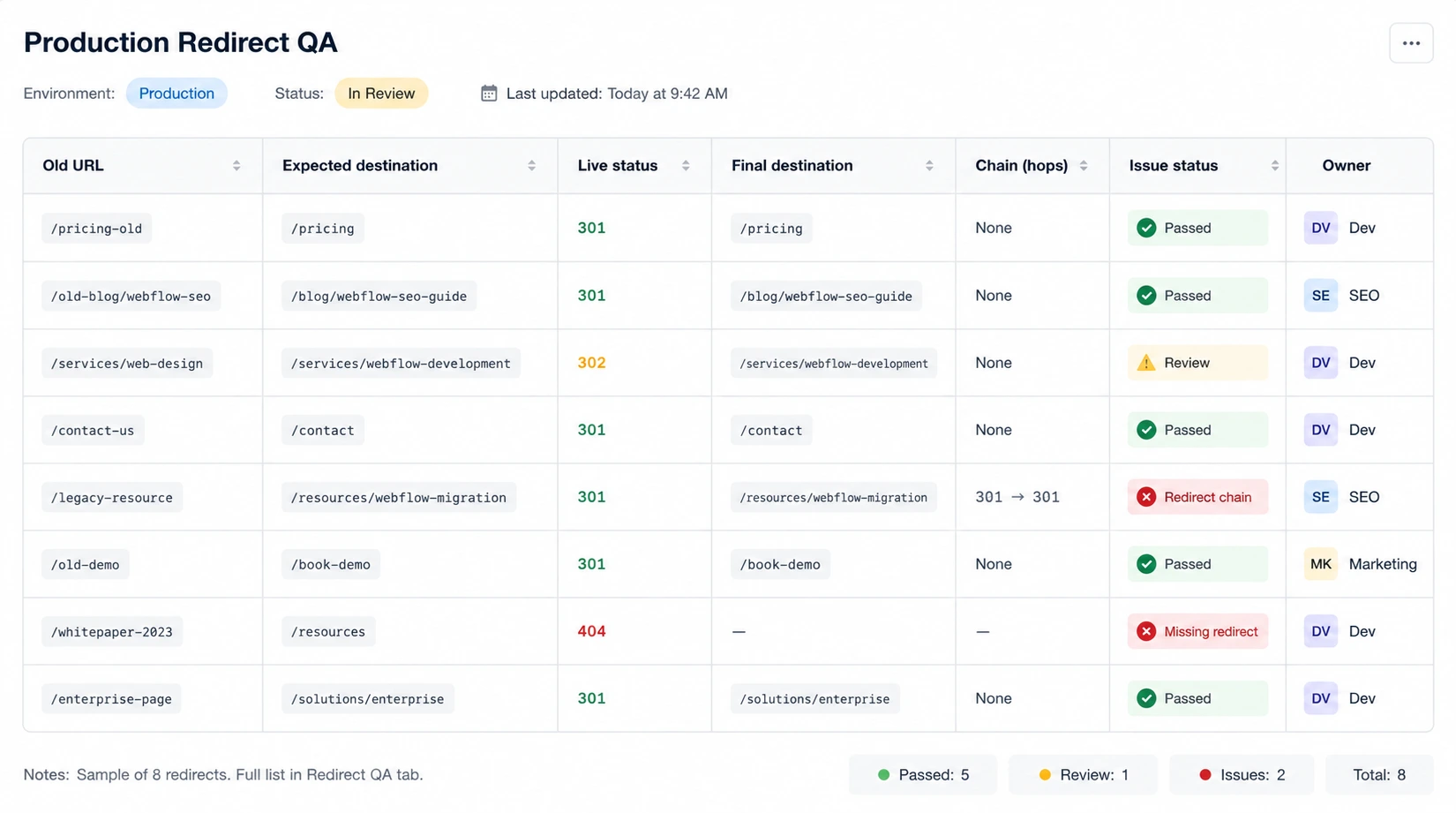
A completed redirect spreadsheet is planning evidence. A tested production response is implementation evidence.
Test forms, analytics, and real conversion events
Submit each important form as a real user would. Confirm the success state, notification, CRM record, lead routing, and any automation that should follow. Then verify the expected event in analytics or the relevant tracking platform.
Check demo requests, contact forms, gated resources, newsletter forms, and other high-value paths. Look for missing events, duplicate events, broken attribution, and consent settings that prevent measurement unexpectedly.
Treat these as immediate launch issues:
- sitewide `noindex` or blocked crawling
- canonicals pointing to the wrong domain
- broken redirects for high-value URLs
- missing or broken CMS templates
- failed lead forms, CRM delivery, or key conversion events
- severe rendering failures across an important page type
Smaller metadata refinements or noncritical image improvements can usually move into a named follow-up backlog. Not every warning requires a rollback.
What to Monitor During the First Weeks After Launch
Record a baseline before release for priority URLs, template groups, organic landing pages, conversions, and key events. After launch, compare affected groups rather than reacting to every daily movement.
Search visibility and technical health
Review Search Console indexing and sitemap reports, crawl errors, unexpected 404s, and canonical selection on priority URLs. Investigate patterns, such as an entire CMS template losing visibility, before assigning a cause to isolated keyword changes.
Monitor Core Web Vitals and representative templates as field data becomes available. Lab tests help diagnose issues quickly, while real-user data shows how the site performs outside a controlled test.
Leads, analytics, and marketing operations
Track organic conversions, form submissions, CRM records, event counts, and attribution. A site can remain crawlable and indexed while silently losing lead data because a form, event, or integration is failing.
There is no universal day when rankings or indexing should be considered settled. Technical QA reduces avoidable launch risk, but it cannot guarantee stable rankings or traffic.
How to Decide Whether the Site Is Ready to Launch
Classify findings by consequence rather than treating every audit warning equally.
Page value and scale matter. One missing description is different from a broken canonical across every CMS page. Every unresolved blocker needs one accountable owner, a defined pass condition, and saved evidence.
A small site with stable URLs and clear ownership may run this process internally. A migration, large content library, complex tracking setup, or launch split across several vendors creates more value for specialist review.
Get A Webflow Technical SEO Launch Review
Quovo can review crawl and index controls, CMS output, redirects, forms, analytics events, and production verification before your team signs off on launch.
Conclusion
Webflow technical SEO is not complete when every setting has been filled in. It is complete when important production pages, CMS templates, URLs, scripts, forms, and conversion events have been tested.
Prepare what you can before launch, prove the live output after publishing, and monitor search and lead data as patterns emerge. The standard for every critical check is clear: one owner, one pass condition, and evidence from the real site.
FAQs About Webflow Technical SEO
Is Webflow good for technical SEO?
Yes. Webflow provides a strong hosted foundation and controls for sitemaps, redirects, SEO fields, CMS templates, and custom code. Results still depend on how the site is structured, configured, optimized, and tested. A capable platform cannot decide which pages should index or verify that production output and tracking are correct.
Can all Webflow technical SEO checks be completed before launch?
No. Staging is useful for reviewing templates, fields, schema, internal links, scripts, and planned settings. The preferred domain, live canonicals, redirects, sitemap hostnames, crawl behavior, analytics events, forms, and Search Console signals require the production site to be live.
Does Webflow create an XML sitemap automatically?
Webflow can automatically generate a sitemap and update it when the site is published. After launch, check that the live sitemap uses the correct hostname and includes the intended canonical, indexable URLs. A sitemap supports discovery, but inclusion does not guarantee indexing.
How soon should a Webflow site be checked after launch?
Check critical production behavior immediately after publishing. Verify domain routing, index controls, canonicals, redirects, forms, CRM delivery, and key analytics events first. Continue reviewing crawling, indexing, traffic, conversions, and performance during the following days and weeks.
Should you use the built-in Webflow SEO settings or custom code?
For most websites, Webflow's built-in SEO settings are enough for titles, meta descriptions, canonical tags, redirects, Open Graph fields, and sitemap generation. Custom code is only necessary for advanced schema, third-party integrations, or specialized tracking. Before adding custom code, make sure it does not duplicate functionality that Webflow already provides.
How many pages should you test before launching a Webflow website?
Avoid checking only the homepage. Review every important page type, then test representative CMS items, including standard pages, high-value landing pages, edge cases with long content, and entries with optional fields left empty. This approach helps uncover template-level issues that could affect dozens or hundreds of pages.
What are the most common technical SEO mistakes after a Webflow launch?
The most common issues include accidentally leaving pages set to noindex, broken or missing redirects, incorrect canonical URLs, duplicate analytics tags, forms that fail to send leads to the CRM, and CMS template errors that affect entire collections. Most of these problems can be avoided with a structured launch QA process.
Do you need a technical SEO audit if you're only redesigning a Webflow website?
Even if URLs stay the same, a technical SEO review is worthwhile. Design updates can unintentionally change metadata, internal linking, structured data, page performance, tracking, or indexability. A final audit helps confirm that the redesign improves the website without introducing avoidable SEO or conversion issues.