

Get in Touch
What to Include in a Website Redesign SEO Audit
.webp)

A website redesign SEO audit is a change-control plan for the pages, URLs, content, CMS templates, internal links, tracking, and launch settings the redesign could affect. It should happen before those decisions are locked, then guide implementation, pre-launch QA, and post-launch monitoring.
That is different from running a crawler and exporting a list of issues. A useful audit decides what the redesign must protect, what it can improve, what needs to be mapped, and what evidence will prove the new site works.
Seemingly harmless decisions can carry real risk. A SaaS product page gets shorter. A resource hub is reorganized. A WordPress blog moves into Webflow CMS. An integration page disappears from the navigation. Each change can affect rankings, backlinks, buyer journeys, demo paths, or attribution.
Start With the Pages, Data, and Decisions the Redesign Could Affect
Begin with the parts of the current site that could change. The goal is not to score every SEO issue. It is to give the redesign team enough evidence to make page, content, URL, and template decisions without guesswork.
Build a complete URL inventory and assign ownership
Export all known live URLs before wireframes, copy plans, CMS models, or migration decisions are finalized. Include static pages, CMS items, blog posts, landing pages, resources, comparisons, solutions, integrations, and high-intent conversion pages.
Do not rely on one crawl. Reconcile the crawl with the sitemap, CMS export, analytics, Search Console, backlink data, and stakeholder lists. Paid landing pages and orphaned resources can be absent from the main crawl while still serving a business purpose.
Each URL should have a page type, owner, current status, and redesign scope. Ownership matters because sales, product marketing, paid acquisition, and SEO may value the same page differently.
Record search, link, and conversion evidence
Traffic and rankings are only part of the baseline. The audit should also consider backlinks, assisted conversions, demo influence, lead quality, CRM context, and sales usefulness where that evidence exists.
This matrix makes disagreements visible. A page can have modest traffic but strong commercial intent, several backlinks, or a useful role in sales. Do not reduce every URL to one score.
Protect pages whose value is easy to miss
An old integration page may look weak but rank for a qualified query. A comparison article may be dated but useful in sales. A resource may produce few direct conversions but earn links that support the wider site.
Flag these pages before anyone deletes, merges, or rewrites them. The audit should explain what value exists and which redesign decision that evidence informs.
Decide What to Preserve, Improve, Merge, Redirect, or Remove
Once the baseline is built, assign one primary action to every important URL. This turns the audit into a redesign brief rather than a report that sits beside the project.
Use a page action framework
If the evidence is incomplete and a page has rankings, backlinks, conversions, or active sales use, preservation is the safer default. Merge or removal should wait until the destination, redirect, internal-link updates, and owner are documented.
Review what a content rewrite could remove
Redesign copy often becomes shorter and more brand-led. That can improve clarity, but it can also remove the language that made a page relevant in search.
For priority pages, create a short preservation brief before rewriting. Record the query themes, buyer questions, product details, proof points, internal links, and conversion path that need to survive, even when the wording and layout change.
This matters on SaaS and B2B product, solution, integration, comparison, industry, pricing-support, and resource pages. The goal is not to keep bloated copy. It is to avoid replacing useful buyer language with vague positioning.
Keep navigation and page-retention decisions separate
Removing a page from the primary navigation does not mean it should disappear. It may still belong in a resource hub, footer, contextual link block, or CMS Collection.
A simplified navigation can help users while preserving valuable pages through stronger contextual links. Treat navigation status and page action as separate fields in the audit.
A product page that ranks and drives demos is usually a preserve or improve candidate. Overlapping feature posts may be merged into a stronger hub. A legacy campaign page with no active use or supporting evidence may be removed. A case study whose Webflow CMS URL changes needs a redirect and launch test.
Know What Your Redesign Must Protect
Quovo can review your priority pages, content decisions, URL changes, and migration risks before they become fixed build requirements.

Map URL, Redirect, Internal Link, and Migration Risks Before Build
URL changes affect search engines, users, backlinks, analytics, and internal links at the same time. Redirect planning should develop alongside the information architecture, not begin during launch week.
Build a controlled redirect map
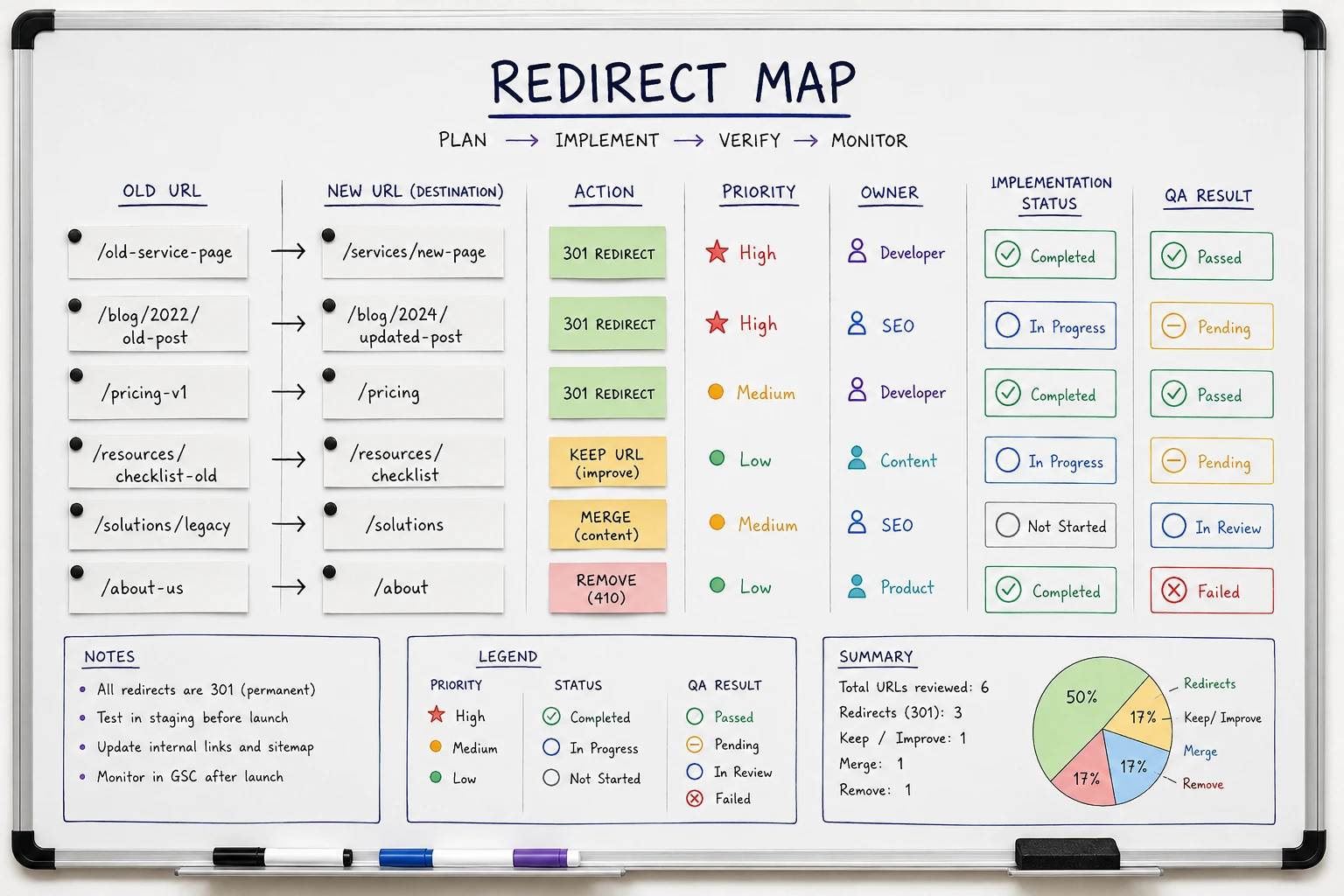
For every changed or consolidated URL, record the old URL, final destination, page type, action, traffic or backlink priority, owner, implementation status, and QA result.
Map removed pages to the closest relevant destination where one exists. Sending unrelated URLs to the homepage is not a substitute for a content decision. Check for duplicate destinations, chains, loops, and URLs with no destination before redirects are imported.
Update internal links to final URLs
Redirects preserve access, but they do not repair the new site's information architecture. Navigation, footer, body copy, CTAs, resource hubs, and CMS templates should link directly to final preferred URLs.
After publishing, crawl for internal redirects and old links. Pay particular attention to reusable components because one outdated template link can appear across hundreds of pages.
Plan Webflow and WordPress migrations as systems
For Webflow redesigns, review slug changes, Collection paths, imported content, redirect imports, sitemap output, and CMS template URLs. WordPress-to-Webflow migrations add categories, tags, authors, media URLs, and legacy permalink patterns that may not map neatly into the new CMS.
During Quovo's MonitorQA redesign and WordPress-to-Webflow migration, more than 120 blog posts had to be considered alongside CMS architecture, URL planning, redirects, technical SEO, analytics, and launch QA. The practical lesson is simple: large migrations need consistent rules before bulk implementation begins.
Audit CMS Templates, Metadata, Indexing, and Structured Content
Redesign SEO risk often lives inside templates. If the CMS model is weak, the new site can create the same metadata, internal-link, or indexation problem whenever marketing publishes.
Define Webflow CMS fields and ownership
Before templates are built, define the fields needed for SEO title, meta description, slug, Open Graph content, canonical handling, and structured data where relevant. Record which values are editor-controlled, template-derived, or developer-controlled, plus any required defaults.
More fields do not automatically create a better CMS. The system should help marketers publish consistent output without turning routine SEO updates into developer tasks.
Test rendered output from real Collection items
Review blog, resource, case study, comparison, and landing-page templates for heading patterns, related-content modules, internal links, schema needs, publish states, and conversion paths.
Then test the rendered output from at least one real item in every Collection. Include a sparse or edge-case record. A template can look correct in Webflow Designer while producing an empty meta description, duplicate heading, broken related-content block, or incomplete schema on the published page.
Validate indexation, canonicals, and sitemap output
Confirm what should be indexable, what should remain hidden, and how templates handle canonicals and sitemap inclusion. Review staging pages, utility pages, campaign pages, duplicate views, and imported content.
Before launch, check rendered meta robots directives, canonical destinations, sitemap URLs, and internal links on the published site. Configuration evidence is not production evidence. A setting is complete only when the live output matches the requirement.
Correct search output is only half of launch readiness. The redesigned site also has to preserve the path from organic landing page to qualified lead.
Include Forms, Analytics, CRM Routing, and Conversion Tracking in the Audit
A redesign can preserve rankings and still fail commercially if attribution or lead flow breaks. Treat conversion paths as part of the audit, not as post-launch cleanup.
Define the complete conversion path
Inventory contact forms, demo requests, trial CTAs, calendar embeds, thank-you pages, hidden fields, notifications, CRM routing, and business-critical analytics events.
For each primary conversion, document the source page, CTA, form, success state, analytics event, CRM record, routing destination, and owner. Separate launch-critical conversions from secondary engagement events.
Test beyond the success message
A useful acceptance test follows the lead through the whole system:
- Visit a tagged organic landing page and trigger the intended CTA.
- Submit the form with recognizable test data.
- Confirm the success or thank-you state.
- Verify the analytics event and relevant campaign parameters.
- Confirm the CRM record, source fields, notification, and routing.
- Save evidence and assign any failed step to an owner.
This matters when forms move into Webflow, HubSpot embeds change, Tag Manager is rebuilt, or tools such as PostHog track important user paths. A visible success message does not prove that attribution or lead handoff survived.
Plan tracking before development is complete
Rebuilding tags from memory after launch creates blind spots. Inventory existing conversion events and define the new triggers, properties, destinations, and expected results before development finishes.
This does not guarantee that every data point will remain identical. It does make critical tracking testable before launch pressure takes over.
Validate the Redesign Before Launch and Monitor After It Goes Live
The audit should end with a control plan. Every critical check needs an owner, expected result, evidence, and escalation path.
Identify launch blockers
Before launch, crawl the staging or preview site where possible and manually test high-risk paths. Treat missing priority redirects, accidental noindex, incorrect canonicals, broken forms, missing analytics, and inaccessible high-value pages as blockers.
Also review metadata, sitemap output, structured data, internal links, and major performance regressions. Focus extra QA on pages that rank, earn backlinks, convert, or support sales.
Run immediate production checks
As soon as the site is live, verify the production output. Test priority redirects, robots directives, canonicals, sitemap access, navigation links, forms, CRM handoff, and analytics events. Save the evidence instead of relying on a verbal confirmation.
Monitor priority pages and conversions
Over the following days and weeks, monitor Search Console coverage, 404s, redirect behavior, priority queries, organic landing pages, form submissions, CRM routing, and conversion events.
Use a predefined watchlist rather than waiting for sitewide traffic to reveal a problem. Aggregate trends can hide an issue on a low-volume page that contributes qualified pipeline.
Know when specialist review is justified
Specialist review is most useful when the redesign changes high-value URLs, platform, large content libraries, CMS templates, navigation, or lead-generation paths. It is also valuable when organic search contributes to pipeline but no one person owns SEO, Webflow implementation, tracking, and launch QA together.
An audit cannot guarantee unchanged rankings. It can preserve known signals, reduce avoidable implementation errors, and make post-launch changes easier to diagnose. Across 120+ completed Webflow projects, that combination of early requirements and production evidence is consistently more reliable than treating SEO as a final checklist.
Review Your Redesign Before Build or Launch
Get a focused review of URLs, redirects, Webflow CMS templates, indexation, forms, analytics, CRM routing, and launch blockers before the redesigned site goes live.
Conclusion
A strong website redesign SEO audit does more than identify problems. It tells the team what the redesign can change, what it must protect, how those decisions should be implemented, and what evidence will prove the launch works.
Build the baseline before design decisions harden. Map page actions, URLs, templates, and conversion paths during the build. Then validate the published site and monitor the pages that matter most. That is how a redesign becomes a controlled improvement rather than an expensive experiment.
FAQs About Website Redesign SEO Audits
What is a website redesign SEO audit?
A website redesign SEO audit reviews pages, URLs, content, rankings, redirects, CMS settings, technical SEO, tracking, and launch risks before or during a redesign. It helps decide what should be protected, improved, merged, redirected, tested, or monitored.
When should you do an SEO audit during a website redesign?
Run the first audit before design, content, URL, CMS, and development decisions are finalized. Then complete another QA pass before launch. The early audit shapes requirements, while the pre-launch review checks whether they were implemented correctly.
Is a redesign SEO audit different from a regular SEO audit?
Yes. A regular SEO audit reviews the current site's health. A redesign audit focuses on upcoming change and should produce implementation requirements, page actions, a redirect map, and launch tests, not only a list of findings.
Can a website redesign hurt SEO?
Yes. Risk increases when important content is removed, URLs change without appropriate redirects, internal links weaken, pages are noindexed, metadata is lost, templates create crawl problems, or performance declines. Early auditing and production validation reduce avoidable risk but cannot guarantee unchanged rankings.
What should be checked in Webflow before launch?
Check redirects, slugs, Collection templates, dynamic metadata, sitemap output, robots and noindex settings, canonicals, forms, and tracking. Test the rendered output from real CMS items and verify the final behavior on the published site.
What should you monitor after launching a redesigned site?
Monitor Search Console coverage, 404s, redirects, priority rankings, organic landing pages, form submissions, CRM routing, analytics events, and conversions. Check technical issues immediately, then continue watching priority pages and queries over the following weeks.
How detailed should a redirect map be during a website redesign?
A redirect map should include every URL that changes or is removed, its final destination, priority, owner, implementation status, and QA result. Recording this information before development reduces missed redirects, duplicate work, and launch-day errors.
Should you audit internal links during a website redesign?
Yes. Internal links should be reviewed before launch because redirects do not replace a well-structured linking strategy. Update navigation, templates, CTAs, resource hubs, and body content to point directly to the new destination URLs rather than relying on redirects.