
Get in Touch
How Long Does a WordPress to Webflow Migration Take Without Risking SEO?

A WordPress to Webflow migration can take from a few weeks to several months. As a practical planning range, a prepared marketing site often needs 4 to 12 weeks, while a large, content-heavy, or redesign-led project may need 12 to 20 weeks or more.
Those are not universal delivery promises. The realistic timeline depends on content readiness, URL changes, CMS complexity, integrations, approval speed, and how much redesign is included.
The key distinction is simple: Webflow build time is not the same as SEO-safe launch readiness. A site can look finished while redirects, content checks, forms, analytics, and stakeholder approvals are still blocking launch.
What Is a Realistic WordPress to Webflow Migration Timeline?
Page count alone is a weak way to estimate a migration. The number of page types, CMS items, URL decisions, integrations, and review rounds usually tells you more.
The following ranges are implementation-informed planning estimates:
These ranges assume content arrives on time, URL decisions are approved, stakeholders return feedback within agreed review windows, and the strategy does not change substantially after development begins. If those conditions are missing, even a relatively small site can take longer.
A two-to-four-week migration can be realistic for a genuinely small site with final copy, stable URLs, limited CMS content, and available decision-makers. It is much less realistic when the same deadline includes a redesign, rewriting, CMS restructuring, hundreds of articles, and new marketing integrations.
Post-launch monitoring also belongs in the project plan, even though it does not necessarily delay go-live. The team still needs to monitor important URLs, crawl issues, indexation, forms, analytics, and organic conversions after release.
When comparing proposals, check whether the estimate covers only Webflow development or the complete migration scope. Inventory, content migration, redirects, technical checks, analytics validation, launch support, and monitoring are separate workstreams.
What Actually Changes the Timeline?
The best estimating question is not "How many pages do we have?" It is "What must be completed, approved, and verified before launch?"
Content and CMS scope
Ten static pages can be more predictable than ten page types connected to several CMS collections. Before bulk migration, the team needs to decide how WordPress posts, authors, categories, resources, custom fields, images, and relationships will map into Webflow.
The first import is not the end of CMS migration. Rich-text formatting, missing images, duplicate slugs, taxonomy differences, and reference fields can create exceptions that need correction and retesting.
On MonitorQA, the WordPress to Webflow migration included a redesign, 120+ blog posts, CMS architecture planning, redirects, technical SEO, and analytics setup. On Flotek, a library of 400+ articles made content mapping, redirect implementation, and technical SEO substantial workstreams. These examples do not define a universal timeline, but they show why content volume changes sequencing and QA effort.
URLs, redirects, and SEO decisions
Keeping URLs stable can reduce redirect work, but it does not remove content and technical validation. Titles, headings, metadata, canonicals, internal links, indexation settings, and sitemap output still need review.
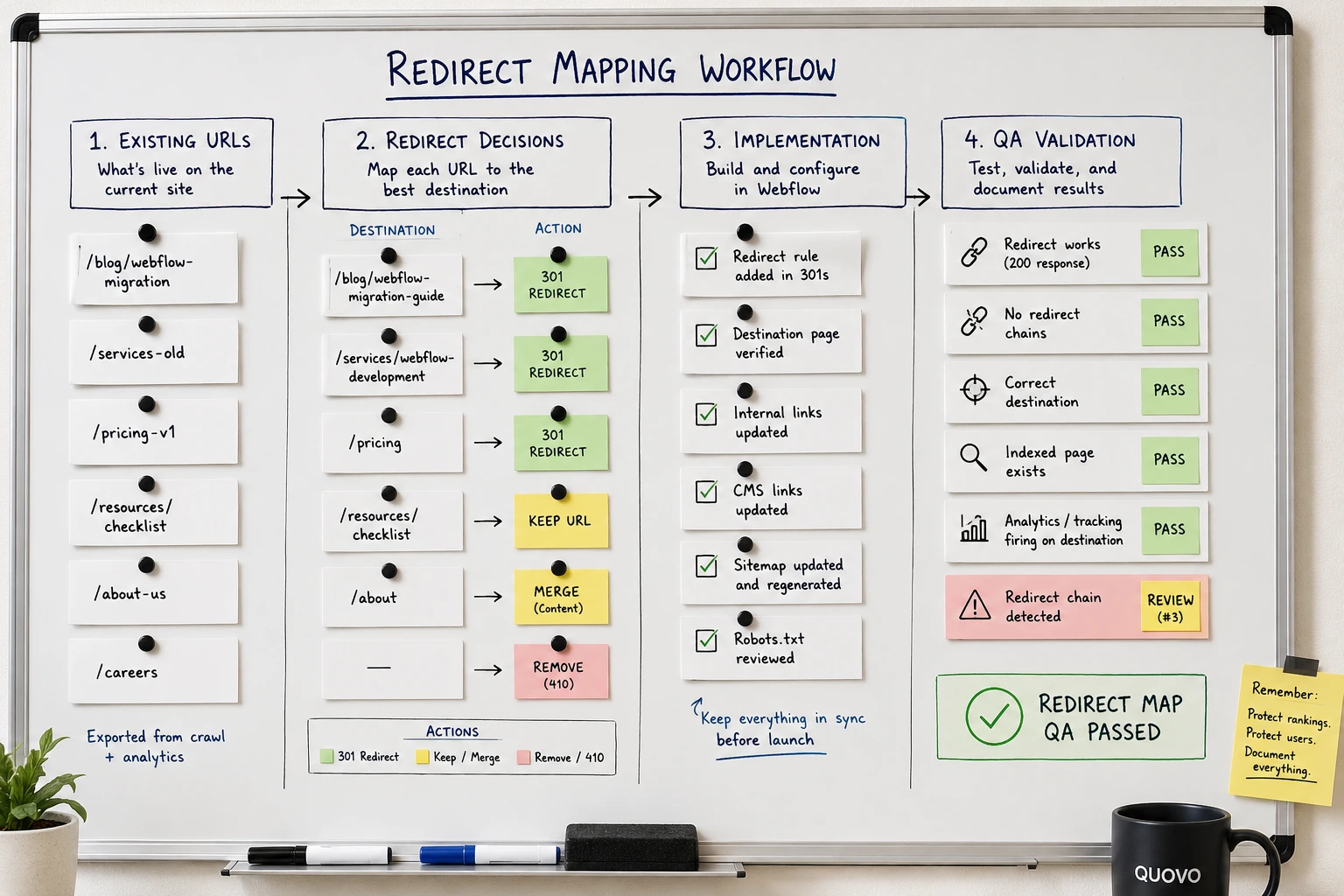
When URLs change, planning should begin with an inventory of the live WordPress site. Each old URL needs a deliberate decision: preserve it, move it, consolidate it, or retire it. Redirect mapping is partly a technical task and partly a content decision. Software cannot decide whether a destination is genuinely relevant.
[Visual: Representative redirect map showing old URL, new destination, action, priority, implementation status, and QA result]
Redesign, approvals, and marketing systems
A platform migration, visual redesign, and content rewrite are separate scopes even when they share one launch date. Late navigation or information-architecture changes can reopen template work, internal links, redirects, and content QA at the same time.
Stakeholder availability is often the hidden timeline driver. A planned two-day review can become a two-week delay when leadership, legal, product, SEO, and marketing review sequentially or reopen earlier decisions.
Forms, CRM routing, consent tools, analytics, advertising pixels, and conversion events also affect launch readiness. Development may be complete while test submissions still route incorrectly or critical events are missing from reporting.
Some work can run in parallel, but dependencies remain. CMS rules should be stable before bulk import. URL decisions should be approved before final redirect QA. The build may finish before content, tracking, or approvals are ready.
Pressure-Test Your Migration Timeline
Quovo can review your URL scope, CMS volume, redesign dependencies, integrations, approvals, and launch requirements before the deadline is locked.

What Should You Never Rush?
Speed is not automatically risky. Skipping inventory, mapping, validation, and ownership is risky.
Launch blockers
- Priority URLs and redirects: Important existing URLs need an approved destination or retirement decision, followed by implementation and testing.
- Indexation controls: Canonicals, robots settings, noindex rules, and sitemap output must support the intended live site.
- Lead paths: Business-critical forms, CRM routing, consent behavior, and confirmation flows need successful test submissions.
- Critical measurement: Analytics and conversion events must produce evidence that important journeys are being recorded.
Important pre-launch quality checks
- CMS and content mapping: Templates, fields, taxonomies, images, and relationships should work across the migrated library, including known exceptions.
- On-page signals: Priority pages should retain the content, headings, metadata, and internal links they need.
- Site quality: Mobile layouts, browser behavior, accessibility basics, and performance should be reviewed before release.
Post-launch responsibilities
- Monitoring ownership: Name who will review crawl errors, indexation, redirects, priority landing pages, forms, events, and organic conversions.
- Response plan: Define who investigates unexpected problems and how urgent fixes will be handled.
-
The detailed execution belongs in a proper migration checklist rather than this timeline article.
A reliable schedule allows the team to complete, verify, fix, and retest. If it only includes time for first completion, it is not a complete launch schedule.
How to Tell If Your Timeline Is Too Aggressive
An ambitious deadline is not automatically unsafe. It becomes unsafe when unresolved scope is ignored or there is no room between first completion and launch.
Warning signs
Your timeline is probably too aggressive when:
- nobody can provide a reliable inventory of URLs, CMS items, or templates
- the estimate is based only on visible navigation pages
- redesign, rewriting, and migration are treated as one task
- CMS architecture will be decided during content import
- redirects are assigned to the final days
- stakeholder review has no owners or response deadlines
- forms and analytics will be checked after launch
- there is no time for fixes and retesting
- the deadline is fixed while scope and content are still changing
- the team cannot explain what qualifies as a launch blocker
A useful test is to ask what happens when full-site QA finds a problem. If the only answer is "we launch anyway," the plan has no real risk-management capacity.
Options when the deadline cannot move
When a campaign, rebrand, or contract creates a fixed date, reduce or phase scope before removing safeguards. You might retain approved copy, preserve high-value URLs where sensible, defer low-priority design enhancements, or phase selected content.
Calling unfinished content "phase two" is not enough. Deferred content needs an explicit plan for its existing URLs, indexation, navigation, and user access at launch.
Several warning signs together matter more than one isolated issue. The goal is not to make every migration slow. It is to ensure the schedule reflects the work and decisions that actually protect the launch.
When redesign is part of the project, information architecture and content changes should be assessed early because they can alter URLs, templates, internal links, and redirects.
When Specialist Migration Support Is Worth It
Internal or lightweight support may be enough when the site is small, URLs remain stable, content is ready, integrations are limited, and the team understands Webflow and migration SEO basics.
Specialist support becomes more valuable when organic traffic drives meaningful leads, the site has many URLs or CMS items, redesign and migration happen together, or forms, tracking, localization, and CRM dependencies are complex.
The sharper test is ownership. If nobody owns the complete path from URL inventory and CMS decisions through Webflow implementation, validation, launch, and monitoring, important gaps can sit between teams.
The right support does not always require a large engagement. A focused redirect review, CMS architecture review, technical SEO audit, or launch-readiness check may close the specific gap. The appropriate level depends on the cost of failure and the capability already available internally.
Quovo's relevant experience combines WordPress to Webflow migration, scalable CMS planning, redirect implementation, technical SEO, analytics, and conversion tracking. That combination is most useful when a project needs one accountable view of launch readiness rather than separate disconnected deliverables.
Plan An SEO-Safe WordPress To Webflow Migration
Get one accountable review of the migration scope, redirects, CMS architecture, technical SEO, tracking, launch blockers, and post-launch responsibilities.
Conclusion
A realistic WordPress to Webflow migration timeline accounts for content, CMS structure, URL decisions, redirects, approvals, marketing systems, QA, and monitoring, not only development speed. Small prepared sites can move quickly. Content-heavy or redesign-led migrations need more planning.
The best way to protect both SEO and the deadline is to identify assumptions, owners, and launch blockers before the build is locked. If your proposed timeline has unresolved scope or no room to verify, fix, and retest, pressure-test it before launch week.
FAQs About WordPress to Webflow Migration Timelines
Can a WordPress to Webflow migration be completed in one week?
Possibly, but only for a genuinely small and prepared site. Design and copy should already be approved, CMS content should be minimal, URLs should remain stable, and integrations should be limited. A one-week schedule becomes risky when it also includes strategy, redesign, rewriting, large-scale content migration, redirects, or several approval rounds. Even if the build fits into one week, functional and SEO QA still need protected time.
Does migrating from WordPress to Webflow hurt SEO?
Changing platforms does not automatically hurt SEO. Risk comes from poorly managed changes to URLs, content, metadata, internal links, canonicals, indexation, and site functionality. Search performance may fluctuate while a migration is processed, so the goal is not to promise zero movement. It is to preserve important signals, prevent avoidable errors, and monitor priority pages and conversions after launch.
Can keeping the same URLs shorten the timeline?
Yes. Stable URLs reduce redirect decisions and remove one source of migration risk. They do not eliminate the need to validate CMS content, metadata, canonicals, internal links, forms, analytics, and sitemap behavior. URL stability can simplify the project, but it is not a reason to skip launch QA.
How long should SEO be monitored after launch?
Monitoring should begin immediately and continue while search engines recrawl the site and the team gathers enough evidence to identify patterns. Review crawl errors, indexation, redirects, priority landing pages, rankings, organic traffic, forms, events, and conversions. The appropriate duration depends on the site's size, importance, and crawl activity rather than one universal period.
How much time should be reserved for redirect mapping?
Redirect mapping should start early, before final Webflow QA. The timeline depends on how many WordPress URLs need to be preserved, consolidated, redirected, or retired. For a small site, this may be a short review. For a content-heavy site, redirect decisions can become one of the main migration workstreams because each important old URL needs a relevant destination and post-implementation testing.
What makes a WordPress to Webflow migration take longer than expected?
The most common causes are unfinished content, late URL or navigation changes, CMS mapping exceptions, slow stakeholder approvals, broken forms, missing analytics events, and redirect QA pushed too close to launch. The Webflow build may look complete while the SEO, tracking, content, and approval workstreams still need time.
Should redesign and migration happen at the same time?
They can happen together, but they should be planned as separate scopes. A redesign can affect page structure, internal links, templates, copy, navigation, and URL decisions. If those choices are still changing during migration, the timeline needs extra room for updates, QA, and retesting.
What should be checked before launching the Webflow site?
Before launch, priority redirects, indexation settings, canonicals, metadata, internal links, migrated CMS content, forms, CRM routing, analytics, conversion events, sitemap output, and key mobile layouts should be checked. The goal is not just to finish the build, but to confirm that the site can launch without avoidable SEO or lead-generation failures.