

Get in Touch
How to Handle Redirects During a Website Migration


A redirect can return the right status code and still produce the wrong migration outcome. The old URL may point to an unrelated page, pass through a chain, or land on content that is blocked from search. A spreadsheet can also look complete while missing URLs that still receive traffic, links, or leads.
In practice, many redirect failures begin before configuration. The old URL was never found, or the destination decision was weak. No technically correct rule can rescue either problem.
The safest way to handle redirects during a website migration is to treat them as a controlled decision system. Find the old URL, choose the right action, implement it cleanly, and verify the final destination. Those four layers make migration risk easier to control and failures easier to diagnose.
Treat Redirects as a Migration Control System
A redirect map is often treated as a simple handoff: one column for old URLs and another for new URLs. That format is useful, but it hides the decisions that determine whether the migration is safe.
Why a 301 response is not the full result
A permanent redirect tells browsers and search engines that a URL has moved. It does not prove that the destination is correct.
Imagine an old technical SEO service page redirecting to the new homepage. The response works, but the visitor no longer reaches an equivalent service, supporting detail, or conversion path. The redirect is technically present and strategically weak.
A successful redirect should reach a relevant, indexable 200 page with the intended canonical URL and next step.
The four layers of redirect quality
Use four questions to review website migration redirects:
A failure at any layer creates a different problem. A missing URL becomes a 404. A weak decision sends people somewhere irrelevant. Poor implementation creates chains or loops. A bad outcome reaches a broken or non-indexable page.
Treat the layers as review gates. A high-priority URL should not move into implementation until its source, value, disposition, destination, and owner are approved.
What redirects can and cannot guarantee
Google's site-move guidance recommends permanent server-side redirects where possible. It also states that 301 and other permanent redirects do not cause a loss in PageRank.
That does not guarantee unchanged rankings or traffic during a significant migration. Search engines still need to recrawl and reindex changed URLs, so temporary fluctuations can happen.
The realistic goal is to prevent avoidable errors, preserve relevant paths, and detect problems quickly. A controlled process offers stronger reassurance than a promise of zero movement.
Build a Complete Inventory of Old URLs
You cannot map a URL you never found. Many redirect plans begin and end with a CMS export or current XML sitemap. Both can miss valuable legacy paths.
Combine several URL sources
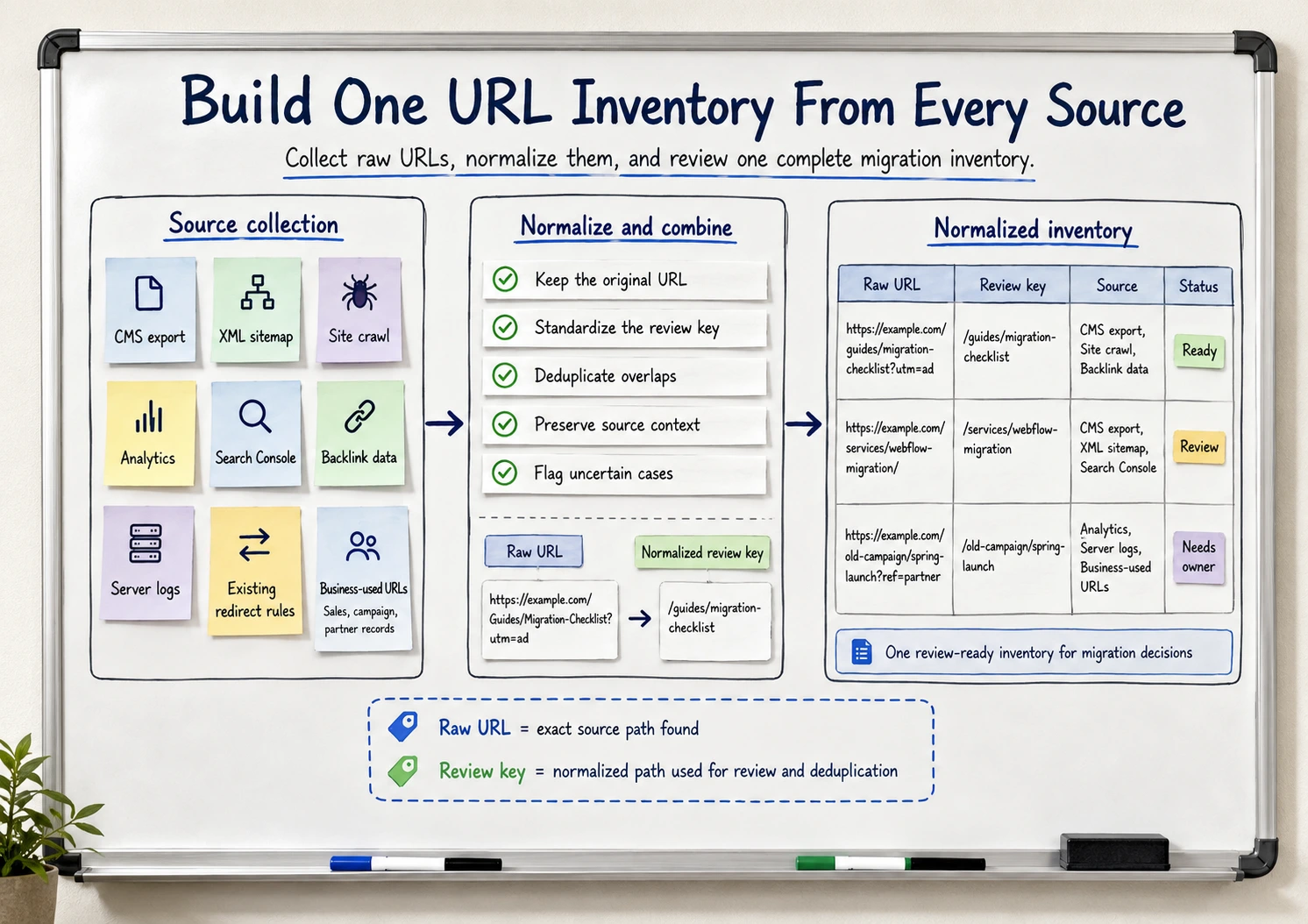
Create one inventory from several sources:
Include files, PDFs, images, subdomains, localized paths, and campaign landing pages where they matter. A page absent from the current navigation may still be used in a partner article, sales deck, email sequence, or customer bookmark.
This wider inventory also connects redirect work to Convert WordPress to Webflow: What Actually Needs to Be Migrated. Content, assets, paths, and old dependencies should be considered together.
Normalize and deduplicate without losing the source
The same page may appear as `/Guide`, `/guide/`, or a parameterized version. Normalize protocols, hostnames, case, trailing slashes, parameters, and URL encoding before review.
Preserve the raw source URL in one field and create a separate normalized review key. That lets the team deduplicate decisions without losing the exact paths that must be tested.
Do not delete variants blindly. First determine whether the old website served them differently or whether existing rules already handle them.
Prioritize URLs by more than traffic
Mark high-priority URLs using several signals:
- Rankings and search impressions
- Backlinks
- Organic and referral visits
- Leads or assisted conversions
- Sales, campaign, partner, or customer use
- Strategic importance to the new website
A low-traffic integration page, report, pricing page, or PDF may deserve more manual attention than a high-traffic archive page if it carries strong backlinks, sales use, or qualified conversions. Traffic alone is not a complete measure of migration risk.
Flotek's WordPress-to-Webflow migration involved more than 400 articles. At that size, redirect planning becomes a data-quality and prioritization problem, not a last-minute manual task.
Decide What Should Happen to Every Old URL
Every meaningful old URL needs a reviewed decision. That does not mean every URL needs a redirect.
Use five possible dispositions
This prevents two common mistakes: changing URLs that could have stayed stable and forcing removed pages onto unrelated destinations.
`Investigate` is useful during planning, but it is not a launch-ready final state for a high-priority URL. Keep those rows visible as blockers until someone approves the action or accepts the risk.
Judge destination relevance, not just URL similarity
Before approving a redirect, ask:
- Does the new page answer the same main need?
- Does it preserve the old topic, offer, or purpose?
- Would someone following the old link understand why they landed there?
- Does the destination retain the necessary detail, proof, and next step?
- Is the destination meant to remain available and indexable?
A useful human test is simple: would a person following the old link feel misled?
The destination does not need identical copy. It needs to be the closest useful replacement. A homepage usually cannot replace a detailed guide, integration page, or specialist service. Google specifically advises against redirecting many old URLs to one irrelevant destination, while allowing consolidation when the new page genuinely covers the older content.
Good and bad redirect examples
Many-to-one redirects become risky when convenience replaces relevance. If several pages address different questions, combining them into a generic destination can remove useful search coverage and buyer context.
The same principle applies when you redesign a website. Page decisions should be based on value and intent, not only on what fits the new sitemap.
Record the decision and its approval state
A usable redirect map should include:
- Raw old URL and normalized review key
- Discovery source and value signals
- Disposition and proposed destination
- Decision reason and priority
- Approval owner and destination-confirmation date
- Implementation status
- Pre-launch and post-launch test status
- Exception notes
This turns the map into a working control document. If the destination changes or a rule fails, the team can see who owns the next decision.
Catch Weak Redirect Decisions Before Implementation
Review high-value URLs, destination relevance, consolidation decisions, owners, and unresolved mappings before they become launch defects.

Implement Redirects Without Chains or Rule Conflicts
Once decisions are approved, implementation should preserve them as directly as possible. A correct spreadsheet can still fail when old rules, broad patterns, and last-minute CMS changes interact.
Use permanent redirects for permanent moves
Google recommends permanent server-side redirects when a URL has moved permanently. Its redirect guidance explains that permanent redirects signal that the target should become canonical, while temporary redirects generally keep the source page as the search-result preference.
Webflow's official training describes 301 redirects as appropriate for permanently routing an old URL to a new one, including changed URL structures, redesigns, and domain moves.
Verify current Webflow behavior before implementing bulk or pattern-based rules.
Point old URLs directly to the final destination
Avoid carrying legacy chains into the new website.
- Weak: `/old-service` redirects to `/services-old`, then to `/technical-seo`
- Better: `/old-service` redirects directly to `/technical-seo`
Direct rules reduce failure points and make testing clearer. Review existing redirects rather than deleting them automatically. Old sources may still receive visits or links and may need to point directly to the final destination.
Test broad rules in both directions
Exact rules provide precision. Wildcard or pattern rules save time when paths follow a stable transformation. The tradeoff is blast radius.
A broad `/blog/*` rule may catch an article that needs a specific destination. Test expected matches and negative cases: URLs that must not match the pattern. A shorter rule list is not safer if reviewers cannot predict its exceptions.
Revalidate after CMS path changes
Collection paths, folders, slugs, and localization decisions must be stable enough for final mapping. If a slug changes after approval, trigger a targeted map and QA update.
MonitorQA's migration combined more than 120 blog posts with Webflow CMS planning, redirects, technical SEO, analytics, and tracking. Those workstreams depended on shared page and path decisions. Redirect work could not be isolated from the build.
This coordination is central to [Internal link: WordPress to Webflow Migration: How to Move Without Losing SEO].
Test the Complete Redirect Outcome
Redirect QA should begin before launch and continue on the live domain. The test is not simply whether the old URL returns 301. It is whether the complete path produces the intended outcome.
Validate the map before implementation
Confirm that:
- Required fields are complete.
- Old URLs are unique after normalization.
- Proposed destinations exist in the final URL plan.
- High-priority mappings received manual review.
- Each disposition has a reason and owner.
- Exceptions and unresolved cases are visible.
High-priority rows without an approved destination or owner should block launch approval rather than being quietly sent to a generic page.
Test the redirect and its final destination
A final page can return 200 and still fail. It may carry a noindex directive left from staging, canonicalize elsewhere, or provide a thin replacement. Response validation and content-relevance review are separate checks and may need different owners.
Check edge cases selectively
Test patterns that actually exist on the old site, including case, trailing slashes, parameters, URL encoding, files, PDFs, subdomains, localized paths, campaign URLs, and existing redirect rules.
There is little value in testing theoretical edge cases while high-value URLs remain unchecked.
Update signals that should not rely on redirects
The new website's internal links, navigation, canonicals, and XML sitemap should point directly to preferred new URLs. Redirects handle old and external paths. They should not become the normal route through the new site.
Use Website Migration SEO Checklist for the full launch process and [Internal link: Webflow Technical SEO: What to Check Before and After Launch] for broader platform verification.
Monitor Redirects and Assign Ownership After Launch
Even a carefully reviewed map needs live monitoring. Production traffic, legacy links, and search crawling can reveal issues that were not visible before launch.
Watch high-priority failures first
Monitor valuable old URLs returning errors, redirects to non-200 pages, chains, loops, unexpected wildcard matches, irrelevant destinations, crawl anomalies, and material traffic or conversion changes.
Start with business-critical and highest-risk URLs, then validate the full inventory. A few broken commercial pages may matter more than many unused paths.
Require verified closure
Every issue should record the URL, problem, priority, likely impact, owner, required fix, deadline, and retest status.
Do not mark an issue complete when someone changes a rule. Retest the old URL and verify the final destination first. The goal is a closed loop from detection to correction and confirmed outcome.
Know when specialist review is justified
An internal team may manage a small migration with stable paths and clear one-to-one replacements. Specialist review becomes more useful with a large business-critical inventory, several legacy migrations, multiple domains or locales, significant organic demand, broad rules, complex exceptions, or an approaching launch with unresolved ownership.
The need depends on value, complexity, and the cost of getting decisions wrong, not URL count alone.
Plan an SEO-Safe Website Migration
Validate URL coverage, redirect destinations, rule risks, final-page QA, and monitoring ownership before your Webflow migration goes live.
Conclusion
A website migration redirect plan is ready only when the team can explain where old URLs came from, why each action was chosen, how every rule behaves, and whether final destinations pass QA.
Use the four layers as the final check: coverage, decision, implementation, and outcome. Keep unresolved high-priority decisions visible, and do not close failures until the old URL has been retested.
When every decision is owned and every fix is verified, the team can launch with clearer expectations and diagnose real problems faster.
FAQs About Website Migration Redirects
Does every old URL need a 301 redirect during a migration?
No. Every meaningful old URL needs a reviewed disposition, but some URLs should remain unchanged. Intentionally removed content may return 404 or 410 when no relevant replacement exists. Redirecting everything can create irrelevant destinations and hide decisions that still need review.
Should old pages redirect to the homepage?
Only when the homepage genuinely replaces the old page's purpose. A detailed guide, integration page, or specialist service usually needs a closer equivalent. Google warns that many irrelevant redirects to one page, such as the homepage, can confuse users and may be treated as soft 404s.
What is the difference between a 301 and 302 redirect?
A 301 indicates a permanent move, while a 302 is temporary. Permanent URL changes during a website migration normally require a permanent redirect. Temporary redirects suit situations where the original URL is expected to return.
Can several old URLs redirect to one new page?
Yes, when the new page genuinely covers the old pages' topics and intent. Many-to-one consolidation becomes risky when distinct questions, audiences, or offers are sent to one generic destination.
When should a removed page return 404 or 410?
Use 404 or 410 when content is intentionally removed and there is no relevant replacement. Before removal, check traffic, rankings, backlinks, conversions, campaign use, and business importance. A forced redirect is not safer when it sends visitors somewhere unrelated.
How do you test redirects after a website migration?
Check the old URL's response, complete redirect path, final 200 response, content relevance, indexability, canonical URL, internal links, sitemap references, and conflicting rules. Test high-value URLs manually as well as through a full crawl or automated process.
How long should website migration redirects remain active?
Google recommends keeping migration redirects as long as possible, generally at least one year, so signals can transfer to new URLs. From a user perspective, keeping them indefinitely may be useful when old links and bookmarks still receive visits.
Can redirects guarantee that rankings will not change?
No. Good redirects preserve relevant paths and reduce preventable errors, but a significant migration may still cause temporary fluctuations while search engines recrawl and reindex changed URLs.